

Staring at a blank page an hour before a client call is one of the fastest ways to send a rushed, generic proposal — and generic is exactly what gets ignored. Most freelancers and small business owners don’t lose deals because their pricing was wrong or their pitch was weak; they lose deals because the document itself looked like it was thrown together in fifteen minutes.
A good business proposal template fixes that problem before you ever type a word. It gives you a proven structure — the sections clients expect to see, in the order that builds trust — so you’re filling in details instead of guessing what to include. You already know how to make the case; our guide on how to write a business proposal that wins clients covers that ground in depth. This article picks up where that leaves off: the actual documents and template libraries that turn that framework into something you can send today.
Below are the five best places to get a business proposal template in 2026, what each one is actually built for, and how to pick the right one for your business.
Quick Answer
The best business proposal template depends on how much design control and automation you need. If you want something free and instantly usable, HubSpot’s template library or the built-in Google Docs and Microsoft Word galleries are the fastest starting point. If visual presentation matters most, Canva offers the most flexible, on-brand designs. If you’re sending proposals regularly and want tracking and e-signatures built in, PandaDoc or Proposify’s template libraries are worth the switch from a static document. The right choice comes down to one question: are you formatting a document, or do you need the sending and tracking handled too?

Best Business Proposal Templates: Top 5 Free & Paid Picks (2026)
Table of Contents
- What Is a Business Proposal Template?
- How to Choose the Right Proposal Template
- Best Business Proposal Templates Available
- Comparison Table
- Best Templates for Different Business Types
- How to Customize a Proposal Template Correctly
- Common Mistakes
- Expert Tips
- Final Thoughts
- Frequently Asked Questions
What Is a Business Proposal Template? {#what-is}
A business proposal template is a pre-built document structure — usually covering the problem statement, proposed solution, scope of work, timeline, pricing, and terms — that you customize for each client instead of writing from scratch every time. Templates range from simple Word or Google Docs files you edit manually to interactive templates built into dedicated software that track views and collect e-signatures.
The best business proposal templates do two things well: they follow a structure that’s proven to convert, and they’re easy enough to personalize that the final document still feels tailored to the client, not copy-pasted. A template that saves you time but reads as generic isn’t actually saving you anything — it’s just moving the credibility problem further down the page.
This matters most once proposals become a regular part of how you win work. If you’re still figuring out how to find your first 10 customers, even a free, basic template is a major upgrade over a blank page. As proposal volume grows, the template you use starts to directly affect how many of those documents actually turn into signed deals.
How to Choose the Right Proposal Template {#how-to-choose}
Before picking a specific template, ask yourself three questions:
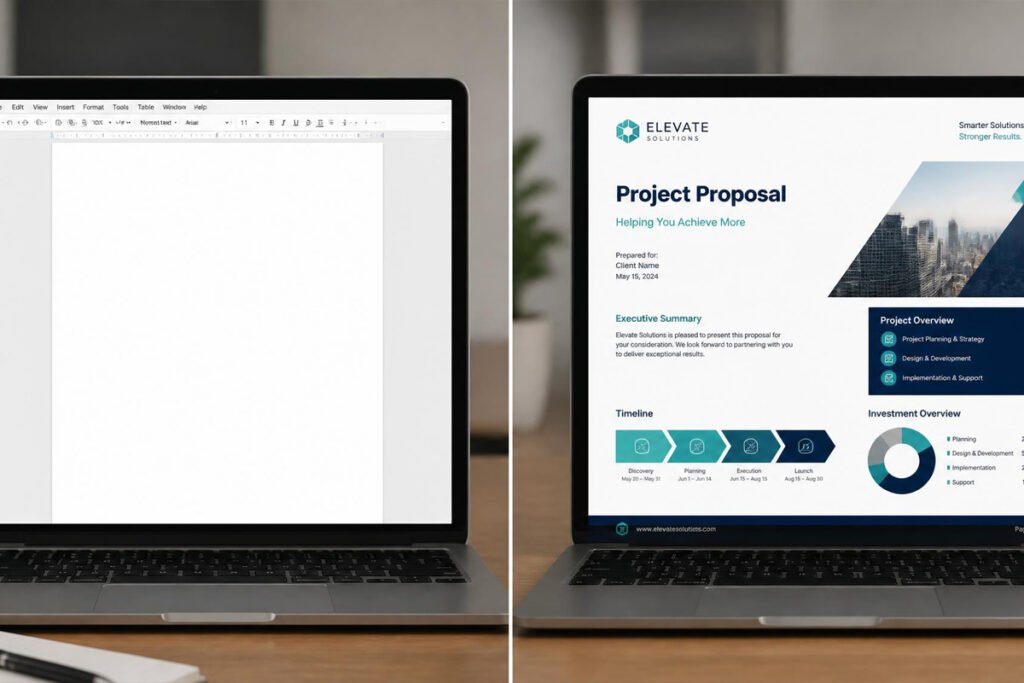
How much design control do you actually need? A text-heavy consulting proposal needs less visual polish than a creative or marketing proposal, where presentation itself is part of what you’re selling.
Will you send this template once or reuse it dozens of times? A one-off proposal is fine as a static Word or Google Docs file. A template you’ll customize weekly benefits from a platform with reusable content blocks, so you’re not rebuilding sections every time.
Do you need tracking and e-signatures, or just a clean document? If you’re currently emailing PDFs and manually chasing signatures, a software-based template library solves two problems at once — our guide to business proposal software covers this in more depth if tracking and signing turn out to be the bigger priority.
According to the U.S. Small Business Administration, small businesses that present clients with clear, professional, well-organized documents are generally better positioned to compete against larger, better-resourced competitors — which is exactly the advantage a strong template is designed to create.
Best Business Proposal Templates Available {#best-options}
1. HubSpot Free Business Proposal Templates
Overview: HubSpot offers one of the most widely used free proposal template packs online, available as editable Word, PowerPoint, and Google Slides files. It’s a strong first choice if you want a proven structure without committing to any new software.
Key Features:
- Multiple layout options (consulting, marketing, sales, general business)
- Editable in Word, PowerPoint, or Google Slides — no new tool to learn
- Includes suggested section copy, not just blank placeholders
- Free with an email signup, no ongoing subscription
Best For: Freelancers and small business owners who want a proven structure but plan to send proposals as a static document or PDF.
Pros: ✅ Completely free ✅ Works in software you already have ✅ Genuinely well-structured, not just decorative
Cons: ❌ No built-in tracking or e-signatures ❌ Manual formatting once you start customizing heavily
Our Verdict: HubSpot’s templates are the easiest way to go from a blank page to a professional-looking document today. Pair the structure with the framing from our business proposal writing guide, and you’ve got a genuinely strong proposal without spending anything.
2. Canva Proposal Templates
Overview: Canva has become the go-to for entrepreneurs who want a proposal that actually looks designed rather than typed. Its drag-and-drop editor and huge template library make it possible to build a visually distinctive proposal without any design background.
Key Features:
- Hundreds of proposal templates across industries and styles
- Full brand kit support (your logo, fonts, and colors applied automatically)
- Drag-and-drop editing with no design skill required
- Export as PDF or share as a live link
Best For: Creative, marketing, and consulting businesses where visual presentation is part of the pitch.
Pros: ✅ Best-looking templates of any free-to-start option ✅ Strong brand consistency across documents ✅ Huge template variety
Cons: ❌ Best templates and brand kit features are behind Canva Pro ❌ No native e-signature or tracking — you’re still emailing a PDF
Our Verdict: If your proposals need to look as sharp as your actual work, Canva is worth the small time investment to learn. It pairs especially well with a consistent personal brand, since every proposal reinforces the same visual identity a client sees everywhere else.
3. Microsoft Word & Google Docs Built-In Templates
Overview: Both Word and Google Docs ship with free, built-in proposal templates accessible directly from the template gallery — no download, signup, or new account required. It’s the lowest-friction option on this list.
Key Features:
- Available instantly inside software almost everyone already has
- Simple, print-friendly layouts
- Easy to share as a Google Doc link with comment access
- No cost, no account beyond what you already use
Best For: Anyone sending an occasional proposal who needs something functional today, with zero setup time.
Pros: ✅ Zero cost, zero new tools ✅ Fastest option to actually open and start editing ✅ Easy real-time collaboration in Google Docs
Cons: ❌ Plainest designs of any option here ❌ No tracking, signatures, or automation of any kind
Our Verdict: These built-in templates won’t win on design, but they’re genuinely useful when you need to send something professional in the next ten minutes. Once proposals become a regular part of your process, revisit this list — a tool like proposal software will save far more time long-term.
4. PandaDoc Template Library
Overview: PandaDoc pairs its proposal software with a library of 750+ industry-specific templates, so you’re not just getting a document — you’re getting one that’s ready to send, track, and get signed without leaving the platform.
Key Features:
- Extensive template library sorted by industry and use case
- E-signatures and payment collection built directly into every template
- Real-time notifications when a client opens or signs
- Reusable content blocks for recurring proposal types
Best For: Freelancers and small service businesses that send proposals regularly and want tracking without a steep learning curve.
Pros: ✅ Free plan available with unlimited documents ✅ Templates come signature-ready out of the box ✅ Fastest path from template to tracked, signed deal
Cons: ❌ Deeper customization and automation require a paid plan ❌ Slightly more setup time than a plain Word or Canva template
Our Verdict: If you’ve outgrown static documents, PandaDoc’s templates solve the two biggest weaknesses of free options — no tracking and no signatures — in one step. It’s a natural pairing with the pricing structures in our how to price a business proposal guide.
5. Proposify Template Gallery
Overview: Proposify’s template library is built for teams, with locked, brand-approved sections so every proposal that goes out — regardless of who’s sending it — stays consistent and on-message.
Key Features:
- Content library with locked, pre-approved sections
- Interactive, adjustable pricing tables inside the template
- Detailed engagement analytics per section
- Custom-branded client portal for every proposal sent
Best For: Small agencies and growing teams where more than one person sends proposals under the same brand.
Pros: ✅ Strongest brand and content consistency across a team ✅ Rich analytics on what clients actually read ✅ Approval workflows before anything goes out
Cons: ❌ No free plan ❌ More setup investment than solo-friendly options
Our Verdict: Once you’re past sending proposals solo, Proposify’s locked template sections prevent outdated pricing or inconsistent messaging from slipping out the door — especially useful once you’ve defined a clear business plan that every proposal needs to reflect.
Comparison Table {#comparison}
| Template Source | Best For | Cost | E-Signatures | Design Quality |
|---|---|---|---|---|
| HubSpot | Free, quick-start structure | Free | No | Good |
| Canva | Visual, brand-forward design | Free / Pro from ~$13/mo | No | Best |
| Word / Google Docs | Zero-setup, occasional use | Free | No | Basic |
| PandaDoc | Solo users who want tracking | Free / $19/mo | Yes | Good |
| Proposify | Teams needing brand control | From $35/mo | Yes | Good |
Best Templates for Different Business Types {#by-business-type}
Freelancers and Solo Consultants
If you’re just formalizing your proposal process, start with HubSpot’s free templates or PandaDoc’s free tier — both give you a proven structure without any upfront cost. This is also a good stage to revisit your freelancing business startup guide, since your proposal template and your broader positioning should tell the same story.
Small Agencies and Service Teams
Once more than one person is sending proposals under your name, a locked template library like Proposify’s prevents outdated pricing or inconsistent service descriptions from reaching a client. Pair it with a strong personal brand and a defined business plan, so every proposal reflects the same story regardless of who wrote it.
High-Ticket or Enterprise-Facing Businesses
For larger, higher-value engagements, Canva’s design flexibility or PandaDoc’s tracking data can help a proposal compete on presentation, not just price. At this stage, also make sure your EIN and business licensing are fully in order — larger clients frequently ask for this documentation before signing anything.

How to Customize a Proposal Template Correctly {#how-to}
According to guidance from SCORE, a nonprofit resource partner of the U.S. Small Business Administration, proposals sent within 24–48 hours of an initial client conversation consistently close at higher rates than those sent a week or more later — which is exactly the speed a good template is meant to enable.
Step 1: Pick a Template That Matches the Work
Start from a template built for your type of project — consulting, creative, or general services — rather than forcing an unrelated layout to fit. This alone saves the most editing time.
Step 2: Replace Every Placeholder Line
Search the document for any bracketed or generic placeholder text and rewrite it with specifics about this client’s actual problem. A proposal with leftover template language is an instant credibility hit.
Step 3: Add Your Pricing Using the Right Model
Drop in your pricing using whichever structure fits the project — flat fee, hourly, retainer, or milestone-based — following the models covered in our proposal pricing guide.
Step 4: Apply Your Branding Consistently
Swap in your logo, brand colors, and fonts if the template supports it. A proposal that looks like it belongs to your business, not a generic template pack, builds more trust before a client reads a single word.
Step 5: Proofread and Send With Tracking On
Read the entire document once more for leftover placeholder text or the wrong client’s name — a common and avoidable mistake — then send it through a tool with tracking enabled so you know exactly when to follow up.
Common Mistakes {#mistakes}
Leaving another client’s name or details in the document. This is the single most damaging template mistake, and it happens more often than you’d think when a template is reused quickly. Always do a full read-through before sending.
Using a template’s default pricing structure without adapting it. A template can’t know whether this project should be flat-fee or hourly — that decision still comes from you, using a model that actually fits the work, as covered in our pricing guide.
Sending a beautifully designed template with weak content. A polished layout can’t rescue a proposal that doesn’t clearly address the client’s actual problem — design and substance both matter, which is why the writing fundamentals in our proposal-writing guide still come first.
Expert Tips {#tips}
Build your own reusable master template. Once you’ve customized a template well for one client, save a cleaned-up copy as your own starting point — you’ll get faster with every proposal instead of starting from the public template each time.
Keep two versions: quick-send and premium. A simple, fast template works for smaller or time-sensitive deals, while a more visually developed one is worth the extra time for high-value proposals where presentation matters more.
Match template complexity to deal size. A one-page flat-fee proposal doesn’t need Proposify’s full team features, and a six-figure engagement shouldn’t be sent on a plain Google Doc — pick the tool for the deal in front of you, not out of habit.

Final Thoughts / Final Verdict {#final-thoughts}
Best overall: HubSpot’s free templates, for the strongest structure at zero cost. Best for design: Canva, for the most polished, brand-consistent look. Best for tracking and signatures: PandaDoc, for turning a template into a trackable, signable document. Best for teams: Proposify, for locked, brand-consistent content at scale.
A template only solves half the problem — it gives you structure, not substance. Pair whichever option you choose with the fundamentals in our business proposal writing guide, confident pricing from our pricing guide, and — once volume picks up — the tracking and signatures covered in our proposal software guide.
Frequently Asked Questions {#faq}
Are free business proposal templates actually good enough to send to clients? Yes, for most freelancers and small businesses. A well-structured free template, properly customized, looks more professional than a template-free document — the main upgrade paid or software-based options offer is tracking and e-signatures, not necessarily better writing.
What file format should I use for a business proposal template? PDF is the safest format for sending a finished proposal, since it preserves formatting on any device. Editable formats like Word or Google Docs are better while you’re still customizing the template.
How long should a business proposal be? Most effective proposals run two to four pages — enough to cover the problem, solution, scope, and pricing clearly without overwhelming the reader. Our proposal-writing guide breaks down the ideal structure in more detail.
Do I need different templates for different industries? Not strictly, but industry-specific templates usually include sections relevant to that type of work already built in — a marketing proposal template, for example, often has a channels-and-KPIs section a general template wouldn’t include.
Business proposal template vs. business proposal software — which do I need first? Start with a template if you’re sending proposals occasionally. Move to dedicated software once you’re sending them regularly enough that tracking, e-signatures, and reusable content blocks start saving meaningful time — our proposal software comparison covers that transition.
Can I use the same template for every client? You can reuse the same base structure, but every section addressing the client’s specific problem, scope, and pricing needs to be rewritten each time. Reusing an entire proposal word-for-word is one of the fastest ways to lose credibility.
Do proposal templates work for service businesses that don’t do creative work? Yes — templates aren’t limited to design-heavy industries. Consulting, legal, accounting, and trades businesses all benefit from a consistent structure; the visual design simply matters less than in creative fields.
Is it worth paying for a premium template if I’m just starting out? Not usually. A free template, properly customized, is enough while you’re building your first client base — our guide to finding your first 10 customers is a better early investment than a paid template library.
Should my proposal template include a section for testimonials or past work? If you have them, yes — a short social proof section meaningfully strengthens a proposal, especially for newer businesses still building trust with each new client.
Can I add e-signatures to a free Word or Canva template? Not natively. If e-signatures matter, either export to a free e-signature tool separately or move to a platform like PandaDoc, which builds signing directly into the template — see our e-signature software guide for standalone options.
How do I keep proposal templates and invoices consistent in branding? Use the same logo, color scheme, and fonts across both — many businesses pair their proposal tool with the invoicing software they already use so the whole client-facing paper trail feels like one connected system.
Author: Morne Winston Last Updated: September 2026